✓No ads✓No account✓Nothing to install
Apple Music to MP3
Convert an Apple Music Song, Album, or Playlist to MP3
Help us keep amtomp3 ad-free and smooth for everyone.
Choose tracks. Save MP3s.
Apple Music to MP3 with amtomp3
amtomp3 converts Apple Music to MP3 files for compatible music apps and players. Use a public song, album or playlist link, then choose the songs you want to save.
Each MP3 keeps available song details and cover art. Copy your saved files to a phone, computer, USB drive or MP3 player.
We are a community project for public benefit. We promise to keep basic Apple Music to MP3 conversion free forever.
Need help with links or finding songs? Try the Apple Music downloader. Learn how amtomp3 works.
Step by step
How to Convert Apple Music to MP3 Online
01
Open your music
To convert Apple Music to MP3, paste a public link or search by song, album or artist. Press Find music to load the results, then open the song list.
music.apple.com/…
02
Listen and select
Press Play to hear the recording. Check the singer, version and length, then tick the songs you want. Select all includes only the rows already loaded.
03
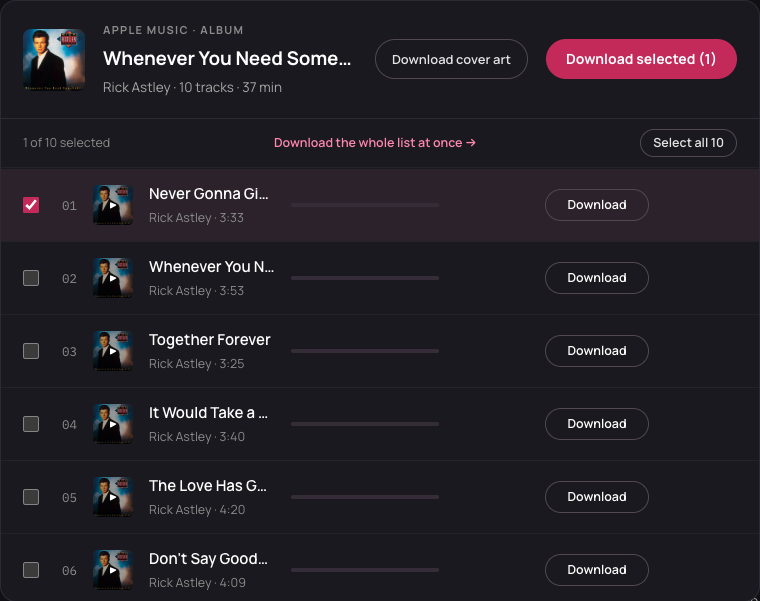
Save your MP3 files
Use the Apple Music to MP3 converter’s download button for one song, or Download selected for a batch. Watch each row and keep this tab open until the files are saved.
Artist - Song title.mp3
Choose what to convert
Convert Songs, Playlists and Albums to MP3
Song to MP3
Convert one song from Apple Music to MP3 without saving the album. Paste its song link or find it by name, then save that track.
Playlists to MP3
The Apple Music to MP3 converter saves the songs you select from a public playlist. Keep your favorites and skip the rest. You do not need to convert every song.
Albums to MP3
Convert an album from Apple Music to MP3 using its album link. Pick one track or several songs. Available album details and track numbers help a compatible player show which songs belong together.
Ready to save your songs? Start converting.
What you can do
Apple Music to MP3 Features
Free and Ad-Free
amtomp3 is free, with no ads, account or payment card. Optional supporter access adds larger batches and ZIP files.
Online Converter
Convert Apple Music to MP3 in your browser on a phone or computer. No app, APK or extension is needed.
Search Music
No link? Search by song, album or artist to convert Apple Music to MP3. Name searches use the US catalog; a pasted link keeps its country.
Play Before Saving
The Apple Music to MP3 converter lets you play the matched recording before saving. Check the singer and version before keeping the file.
High Quality
The Apple Music to MP3 converter uses a 320 kbps output setting. Sound quality depends on the source; it cannot restore detail missing from that recording.
Song Names and Covers
Each MP3 keeps available song titles, artists, album details and covers. When synced lyrics are found, save the separate .lrc file beside the MP3 for a player that supports it.
For larger batches and ZIP files, see supporter access.
Save and play your MP3s
Convert Apple Music to MP3 on Your Devices
Apple Music to MP3 on Windows or Mac
Check your browser’s Downloads folder. Open an MP3 in a compatible player, or copy it to a USB drive or MP3 player. Unzip a supporter batch before copying songs. For an older player or car stereo, try one file first and check its format rules.
Convert Apple Music to MP3 on iPhone or Android
Save Apple Music to MP3 in your phone’s browser. On iPhone, open Files and check Safari’s selected Downloads folder. On Android, check Downloads or your browser’s chosen folder. Use a compatible MP3 player app; saving a file does not add it to your Apple Music library.
Using Apple Music’s own app? See Apple’s offline-listening guide. Its saved songs stay in the app and are separate from these MP3 files.
FAQ
Apple Music to MP3 FAQ
Will the album play in the right order?
Not automatically. Apple Music to MP3 files can include track numbers for a compatible player, but tags may be missing or incomplete. Files use Artist - Title names, so sorting by name can change the order. Check your player’s sorting or arrange the songs yourself.
Can I convert a whole playlist?
You can convert available, matched songs in batches. Free batches allow up to three songs; supporter access adds larger batches. The Apple Music to MP3 converter flags partial lists. Use Load more when offered; Select all covers loaded rows. Supporter access cannot recover missing tracks.
Can I convert my Apple Music subscription files?
No. The Apple Music to MP3 converter uses public links and name searches. It cannot open protected subscription files or private libraries, remove DRM, or export Apple’s original audio.
Why does a song sound different?
The audio comes from a public source and may be a live version, remix or cover. Play it before saving. If it is the wrong version, search for a different release and check that result.
What should I do if a song fails?
Check the row’s error message and use Retry when offered. If a failed song shows other sources, choose one and try again. Other songs can still finish. If the link does not open, paste its full public share link or search by name.
Why did only one selected file save?
Your browser may have blocked multiple downloads. Allow this site to save multiple files, then save the other completed songs while the tab is open. A failed song needs a retry first.
Why did I reach the daily limit?
Free use allows 30 new song requests per public IP each day, shared by devices and connected tools. Preparing a song to play or download counts even if it fails. A three-song batch uses three requests. Replaying or saving an already prepared file uses no new request. The limit resets at midnight UTC; supporter access removes it.
Last updated: MP3 files · free and ad-free · song names and covers
- 25 October 2026 — Updated the MP3 conversion steps and download help. Find answers about free use, missing songs and saved files.
- 24 October 2026 — Added a guide for public Apple Music song, album and playlist links.