✓No ads✓No account✓Nothing to install
Apple Music Downloader
Download Songs from Apple Music Albums and Playlists
Help us keep amtomp3 ad-free and smooth for everyone.
Start with a public link
Find Music with the Apple Music Downloader
amtomp3 offers an Apple Music downloader for public song, album and playlist links. Paste a link or search by song, album or artist name. Open a result, check the songs and choose what to download.
It reads public music pages, not private libraries or protected subscription files. The audio comes from a separate public source and may be a different recording. Play the song before saving it.
We run amtomp3 as a community project for public benefit. We promise to keep the basic Apple Music downloader free forever, without ads or sign-up. Support is optional.
For MP3 quality, song tags and player support, see the Apple Music to MP3 converter.
Find the music, then choose
How to Use the Apple Music Downloader
01
Paste a Link or Search
Paste a public share link into the Apple Music downloader, or enter a song, album or artist name. Click Find music to see results, then open the song, album or artist you want.
music.apple.com/…
02
Choose Your Songs
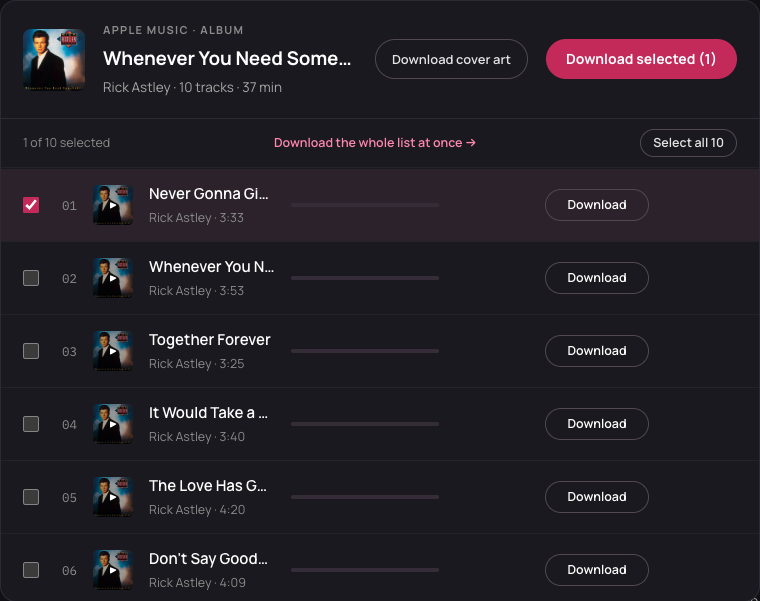
Check the title, artist and cover in the Apple Music downloader. Use Play to check the recording, then select the songs you want. Read any notice about missing tracks.
03
Download Your Selection
Use the download button for one song or Download selected for several. Free batches contain up to three songs as separate files. Supporter access adds larger batches and ZIP files. Keep this page open, then save completed songs and check any failed rows.
Choose tracks → Download selected
Three ways to open your music
Links You Can Use in the Apple Music Downloader
Song Links
A song share link opens one track in the Apple Music downloader. Some song links use an album address with ?i= followed by the song ID. Keep that part of the link to open the right song.
Album Links
Paste the album’s own share link into the Apple Music downloader to load its track list. Check the release and choose your songs. A link with a song ID may open just that song, so copy the album link again if needed.
Playlist Links
The Apple Music downloader needs a public share link to open a playlist. Searching its name will not load its songs. Choose from the tracks available on the page and read the coverage notice if the list is incomplete.
The controls you need
Apple Music Downloader Features
Search Music
Find songs and albums by name with the Apple Music downloader. Add the artist to narrow the results. Name searches use the US catalog; pasted links use the country in the address.
Browse an Artist
Search for an artist in the Apple Music downloader, then open their available top songs or releases. Choose a song or open an album to see its tracks. This does not download the artist’s whole catalog.
Play Before Saving
The Apple Music downloader can play the full matched recording before you save it. Check the singer and version. Preparing audio to play or download uses the same daily allowance; opening a track list only loads details.
Choose Your Tracks
Select the songs you want in the Apple Music downloader. Select all covers loaded rows, not tracks that have yet to load. Free use saves separate files; larger selections and ZIP files require supporter access.
Retry Failed Songs
Each row in the Apple Music downloader shows whether a song finished or failed. Use Retry if it appears. If a failed song shows other sources, choose one and try again. You can save songs that are already complete.
No App Needed
Use the Apple Music downloader in a phone or computer browser. No app, Apple account connection or audio upload is needed.
For larger batches, ZIP files or gift-key activation, see supporter access.
Use the browser you already have
Use the Apple Music Downloader on Your Device
PC and Mac
Use the Apple Music downloader in your browser. Completed songs go to your browser’s download list or chosen folder. Unzip a supporter batch before opening the songs.
iPhone and Android
Keep the page open until your songs finish, then check your browser’s download list. On iPhone, look in Files; on Android, check Downloads. For help opening MP3 files in a music player, use the converter guide below.
For save locations and music-player help, see Apple Music to MP3 on your device. For offline listening in Apple’s app, follow Apple’s download instructions.
Links, coverage and download questions
Apple Music Downloader FAQ
Is the Apple Music downloader free?
Yes. Basic use is free forever, with no account, payment card or Apple Music subscription. Supporter access adds larger batches and ZIP files and removes the free daily cap.
Why does my link not open?
The link may be incomplete, private or a page we cannot read. Copy the full public share link from Apple Music, keeping its country code and song ID. If it still fails, search for the song or album by name and artist.
Why are songs missing from my playlist?
The Apple Music downloader may receive only part of a public playlist. Read the coverage notice and click Load more when offered. If a song is still missing, try its own public share link; supporter access does not expand the public list.
What is the free daily limit?
You get 30 new song requests per public IP each day, shared across devices and connected tools. An accepted request counts even if it later fails. A three-song batch uses three requests. Replaying or saving already prepared audio uses no new request. The limit resets at midnight UTC.
What if I get the wrong version?
Search for another release and play its match before saving. The Apple Music downloader matches public audio, so it can return a live version, remix or cover. If the new result is still wrong, skip it.
Why did a song fail to download?
A matching recording may be missing or temporarily unavailable. Read the row’s message, then use Retry if it appears. If the failed song shows other sources, choose one and try again. You can still save other completed songs.
Why did only one file save?
Your browser may have blocked multiple downloads. Allow them for this site or save each completed song separately. Check your browser’s download list before starting again; a failed row needs a retry or another match before it has a file to save.
Need help with a public link? Contact amtomp3 support.
Last updated: . About amtomp3.